Inventive solutions for your projects

Sykerö TimeStyle app icon

Pebble watch apps

Six apps for the Pebble smartwatch — all open source, all published on the Pebble appstore.

Overview

Pebble is the smartwatch that outlived its own company: the hardware is being made again, the firmware is open, and the watch still does the one thing a watch should do — run for days and answer instantly.

These six apps started as things I wanted on my own wrist. They are written in C against the Pebble SDK, with the phone-side configuration in TypeScript, and every one of them is open source on GitHub.
The apps

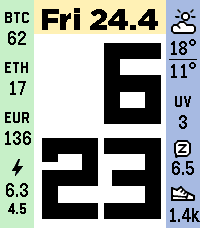
Sykerö TimeStyle on a Pebble Time 2

Sykerö TimeStyle

Watchface

Time, date and weather with two columns of optional widgets — battery, steps, sleep, electricity spot price, crypto, UV and more — in colours you pick yourself, with a separate night palette. It also shows live status from the two companion apps below.

Sykerö Smart Alarm alarm list

Sykerö Smart Alarm

Watchapp

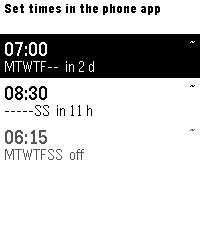
Wakes you a few minutes early, at a moment you are already stirring — measured against how still you have been that night, never later than the time you set. Eight alarms, a gradual wake-up and a calibration summary of last night.

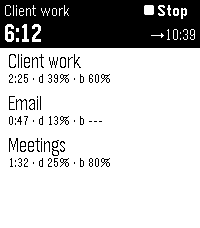
Sykerö Track Work Time task list

Sykerö Track Work Time

Watchapp

Start and stop tracking from your wrist, switch task, and see time worked today and time left. Companion to the Track Work Time Android app for work hours, flextime and budgeted tasks.

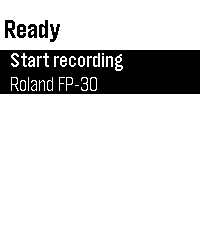
MIDI Recorder watchapp ready to record

MIDI Recorder

Watchapp

Start and stop recording with one tap, and see the take length and the connected keyboard at a glance — useful when the phone is across the room and your hands are on the keys. Companion to the MIDI Recorder app.
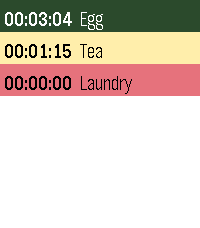
Countdown timer list on a Pebble

Countdown timer

Watchapp

Up to 16 named timers, several running at once, each vibrating at zero even when the app is closed. Sort by most recently used, shortest remaining or longest remaining.

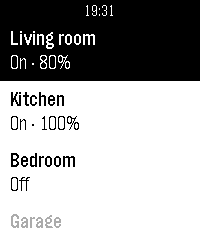
Tuya Lights list of smart lights

Tuya Lights

Watchapp

Every Tuya / Smart Life light in one list, on or off with a tap, brightness and colour temperature a click deeper. Most-used lights stay on top, offline ones are greyed out, and a command always names the light it was meant for.

How to install

Open a link above on the phone that is paired with your Pebble and install from the appstore listing, or build the app yourself from its GitHub repository with the Pebble SDK. Screenshots on this page are from a Pebble Time 2.